
Spec Update
As of 7/16, we’ve cleaned up the Project 2 specs with the following changes:
- “words” files are now referred to as “word history” files, while “counts” files are now referred to as “year history” files, see the NGrams section in the Data page.
- Refactored relevant data sections into it’s own “Data” page
- Refactored relevant testing sections into it’s own “Testing” page
- Standardized and cleaned up miscellaneous parts of spec
- New “Above and Beyond” page
There are NO new requirements for the project and the autograder/skeleton code is the same as before, so if you have already completed Project 2A: NGrams, you don’t need to do anything!
Please Do Not Cheat in CS61BL
Code Interview
As a reminder, all students will be required to complete a code interview for Project 2.
All students who submit Project 2 must complete a code interview. The interview will be about 15 minutes in length, and will test your conceptual understanding of the project and the code that you wrote. You will have access to your Project 2 code during the interview.
You are expected to complete this interview in-person. Interviews will take place from 7/27 to 7/31.
If you cannot demonstrate understanding of the project (or fail to complete a code interview at all), your project grade will be replaced with a 0.
We want to stress that we don’t want you to fail. The interview will be structured such that, if you are able to demonstrate a reasonable level of understanding, you will pass.
If you have any concerns about completing this interview, please email cs61bl@berkeley.edu before the 7/26 deadline. Otherwise, we cannot guarantee any accommodations.
Project 2B: Wordnet
Lectures needed for this project:
- Lecture 3: ADTs + Lists
- Lecture 6: BSTs + Traversals
- Lecture 9: Graph Traversals, DAGs, Topological Sorts
Partner policy: No partners. Discussing ideas with other students is allowed, but code sharing is not allowed, and the solutions you submit should be your own work! More details on the policies page.
LLM policy: LLMs should not write any of the code that you turn in. See more info in the LLM policies page for more details.
In this project, we will continue building out the browser-based tool NGordnet by adding a new feature to return hyponyms within the WordNet dataset. (Don’t worry we’ll explain this later in the spec).
Unlike Project 2A, the implementation for this part of the project is very open-ended. Deciding on an overall design is an important skill that we’ll also revisit in Project 3: BYOW. The number of lines of code for this project isn’t necessarily large, but there are a lot of independent decisions that you’ll need to make along the way.
See below or click here for a video introduction to the project. Note that the video might have some slightly outdated sections.
Setup
Follow the Assignment Workflow Guide to get started with this assignment. This
starter code is in the proj2b folder.
You’ll also need to download the Wordnet data files (they are around 150 MB, which is too large to be pushed to GitHub).
You’ll notice that this skeleton is (almost) the exact same as the Project 2A skeleton. Project 2B uses the NGramMap class from Project 2A, which is why we have provided a placeholder implementation for it. This includes a working implementation of the countHistory method. You can try testing with your own implementation but we strongly recommend using the staff implementation.
You may have also noticed that the Plotter class and the other handlers are not in the skeleton. Since they depend on TimeSeries, if you want to use them, you’ll have to copy it in from Project 2A along with your TimeSeries implementation. After importing library-su26, the code in NGramMap.java should no longer be red.
Task 0: Wordnet Data
Follow the instructions in the Data spec to get the Wordnet data. There, you’ll find descriptions of the dataset. Make sure you understand how each file is structured so you can read and parse it.
Optional Tasks: Design and Checkpoint
Project 2B: Wordnet Design is a design assignment for you to plan your approach for Wordnet before implementing it. Although this is optional, we highly recommend attempting this to ensure you have a plan before coding Wordnet.
Additionally, Project 2B: Wordnet Checkpoint is a conceptual assignment testing your understanding of Wordnet. We highly recommend completing this to ensure you have a correct understanding of Wordnet.
Task 1: Dummy HyponymsHandler
- Open the
ngordnet.htmlfile in thestaticfolder in your web browser, just like how you did for Project 2A. Go here for a refresher on how to do this. You’ll see two new things: “Hyponyms” button andkinput. Ignore thekinput for now.- Try clicking the Hyponyms button. You’ll see nothing happens (and if you open the developer tools feature of your web browser, you’ll see that your browser shows an error).
In Project 2B, your primary objective is to implement this button, which will require reading in a different type of dataset and synthesizing the results with the dataset from Project 2A. Unlike 2A, it will be entirely up to you to decide what classes/methods you create to help with this task.
- Start by opening your
Main.javafile.- Create a new file called
HyponymsHandlerthat simply returns the word “Hello!” when the user clicks the Hyponyms button in the browser. You’ll need to create a newHyponymsHandlerclass that extends theNgordnetQueryHandlerclass. See the Handler classes from Project 2A for examples. Make sure when you register your handler that you use the string “hyponyms” as the first argument to theregistermethod, and not “hyponym”.- Once you’ve modified
Mainso that your new handler is registered to handle hyponyms requests, start upMainand try clicking the Hyponyms button in your web browser again. You should see text appear that says “Hello”.
Additional resources:
- Staff Solution Webpage: Useful for generating expected outputs for different test case inputs. Use this to write your unit tests!
- Note that this is on the files
word_history_size14377,year_history.csv,synsets_size82191.txt, andhyponyms_size82191.txtand you may get different results based on what files you use!- You can use the visualize graph feature to help visualize the hypo/hypernym relationships. This will not consider start year, end year, or k and visualize the children of a selected synset from the first word in the input list of words.
- Wordnet Visualizer: Useful for visually understanding how synsets and hyponyms work and testing different words/lists of words for potential test case inputs. Click on the “?” bubbles to learn how to use the various features of this tool!
Hyponyms (Basic Case)
In the next 3 tasks, you’ll create a partial implementation of the Hyponyms button. For now, this button should:
- Assume that the “words” entered is only a single word.
- Ignore startYear, endYear, and k.
- Return a string representation of a list of the hyponyms of the single word, including the word itself. The list should be in alphabetical order, with no repeated words. You should sort it case-sensitively (which java already does! Just make sure you don’t put in extra logic to make it case insensitive).
For example, suppose the WordNet dataset looks like the diagram below (given to you as the input files synsets_size11.txt
and hyponyms_size11.txt). Suppose that the user enters “descent” and clicks on the Hyponyms button.
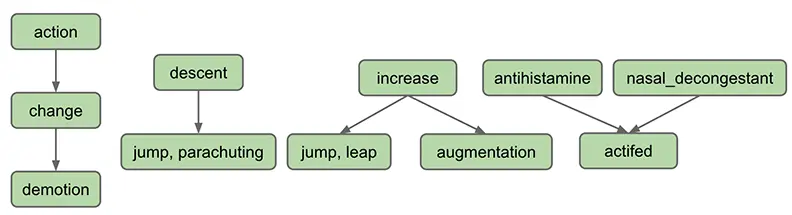
In this case, the output of your handler should be the string representation of a list containing “descent”, “jump”
and “
parachuting”, i.e [descent, jump, parachuting]. Note that the words are in alphabetical order.
As another example, suppose we’re using a slightly bigger dataset such as the one below (given to you as the input
files synsets_size16.txt and hyponyms_size16.txt):
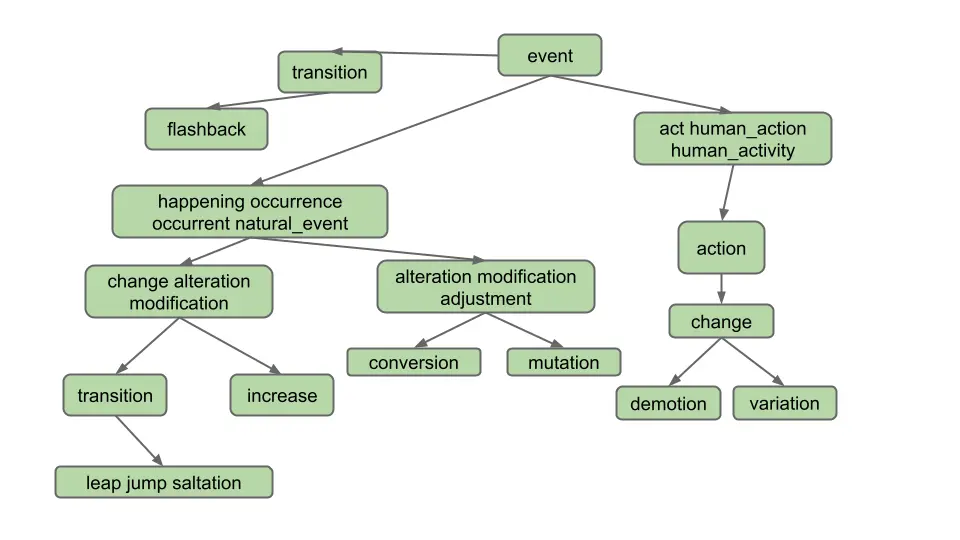
Suppose the user enters “change” and clicks on the Hyponyms button. In this case, the hyponyms are all the words in the blue nodes in the diagram below:
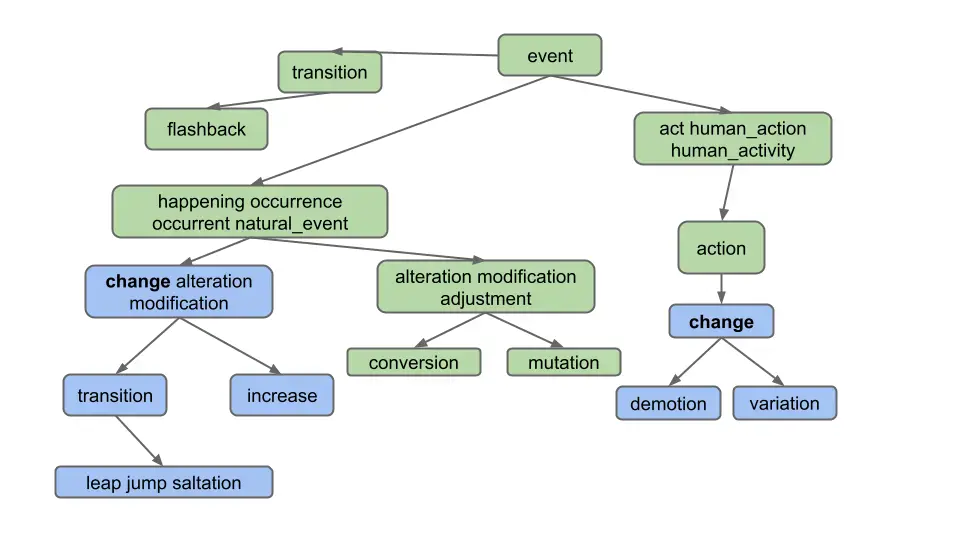
That is the output
is [alteration, change, demotion, increase, jump, leap, modification, saltation, transition, variation]. Note that
even though “change” belongs to two different synsets, it only appears once.
Don’t overthink this and make life harder than it needs to be. Specifically, observe that the output does not include:
- Synonyms of synonyms (e.g. does not include “adjustment”)
- Hyponyms of synonyms (e.g. does not include “conversion”)
- Hyponyms of other definitions of hyponyms (e.g. does not include “flashback”, which is a hyponym of another definition of “transition”)
In other words, solving this problem in the most straightforward way is good enough.
Task 2: Graph Implementation
To get the Hyponyms button working, you’ll need some kind of implementation of a directed graph as described in Lecture 9: Graph Traversals, DAGs, Topological Sorts. We suggest starting this project by creating such an implementation.
Implement a directed graph to represent Wordnet.
This project is unlike any project earlier in the class. We won’t be grading your graph implementation, and we won’t even be telling you what to put into it. That’s your choice.
To decide what methods to include in your graph design, you’ll have to think ahead to how you’ll use it. This will require understanding the entire task described below.
You may also want additional helper classes/methods that represent the idea of a traversal, but this is not required - you can implement your traversal within your graph implementation as well.
For this project, you may not import any existing graph library into your code. Instead, you should build your own graph class or classes. Recall that you are not allowed to use LLMs for code generaton on this project!
Since you’re only going to be creating one implementation, there’s no need to define an interface. That is, rather than having a DirectedGraph interface with several implementations, e.g. AdjacencyMatrixDG and AdjacencyListDG, you should just write a class.
For testing your Graph, see the Testing spec for more information.
Task 3: Reading WordNet Dataset Files
- Parse the Wordnet data files.
- Use your directed graph implementation to store the data.
Design Tips
The Hyponyms button involves having to do all sorts of different lookups, graph operations, and data processing operations. There is no one right way to do this.
Here are some example lookups that you might need to perform on the WordNet dataset:
- Given a word (e.g. “change”), what nodes contain that word?
- Example in synsets_size16.txt: change is in synsets 2 and 8
- Given an integer, what node goes with that index?
- Necessary for processing hyponyms.txt. For example in hyponyms16.txt, we know that the node with synset 8 points at synsets 9 and 10, so we need to be able to find node 8 to get its adjacency list.
- Given a node, what words are in that node?
- Example in synsets_size16.txt: synset 11 contains alteration, modification, and adjustment
Here are some example graph operations you might need to perform:
- Creating a node, e.g. each line of
synsets_size16.txtcontains the information for a node. - Adding edges between nodes node, e.g. each line of
hyponyms_size16.txtcontains one or more edges that should be added to the corresponding node. - Finding reachable nodes, e.g. the nodes reachable from node #7 in
hyponyms_size16.txtare 7, 8, 9, 10.
Your life will be a lot easier if you select instance variables for your classes that naturally help solve all six of the problems above.
If you over-engineer and write methods that you end up not needing, that’s fine.
Just like NGramMap, you’ll want your helper classes to only parse the input files once. Do not create methods that have to read the entire Wordnet file every time they are called. This will be too slow!
Also, a reminder from Project 2A: Deeply nested generics are a warning sign that you are doing something too complicated. Either find a simpler way or create a helper class to help manage the complexity. For example, if you find yourself trying to use something like Map<Set<Set<..., you have started a walk down an unnecessarily difficult path.
If you have a design that is painful and with which you cannot make progress, don’t be afraid to delete your existing instance variables and try again. The hard part of this project is the design, not the programming. You can always use git to recover your old design if you decide you actually liked it.
Task 4: Traversing the WordNet Graph
Use an algorithm on your directed graph implementation to return the hyponyms of the query.
Now that you have a way to represent the WordNet dataset in memory, the last step in building the Hyponyms button is writing code that takes a word, and uses a graph traversal to find all hyponyms of that word in the given graph.
We recommend adding code to a WordNet class so that a WordNet object is able to take a word and return its hyponyms.
Design Tips
Here are some example data processing operations you might need in this task:
- Given a collection of things, how do you find all non-duplicate items? (Hint: There is a data structure that makes this very easy and efficient). Don’t be afraid to also search the internet for the data structure that you choose (e.g. if you choose to use a TreeMap for whatever reason, feel free to look up “TreeMap methods java”, “Map methods java”, or “Collection methods java”, etc).
- Given a collection of things, how do you sort them? (Hint: Google how to sort the collection that you’re using)
For testing your WordNet and the Single Word case, see the Testing spec for more information.
For testing in browser and debugging tips, see the Testing in Browser and Debugging sections of the Testing spec.
Handling Lists of Words
Your next objective is to handle lists of words. As an example, if the user enters “change, occurrence” for the diagram below, we should only return common hyponyms of each word, i.e. [alteration, change, increase, jump, leap, modification, saltation, transition]. “Demotion” and “variation” are not included because they are not hyponyms of both words; specifically, they are not hyponyms of “occurrence”.
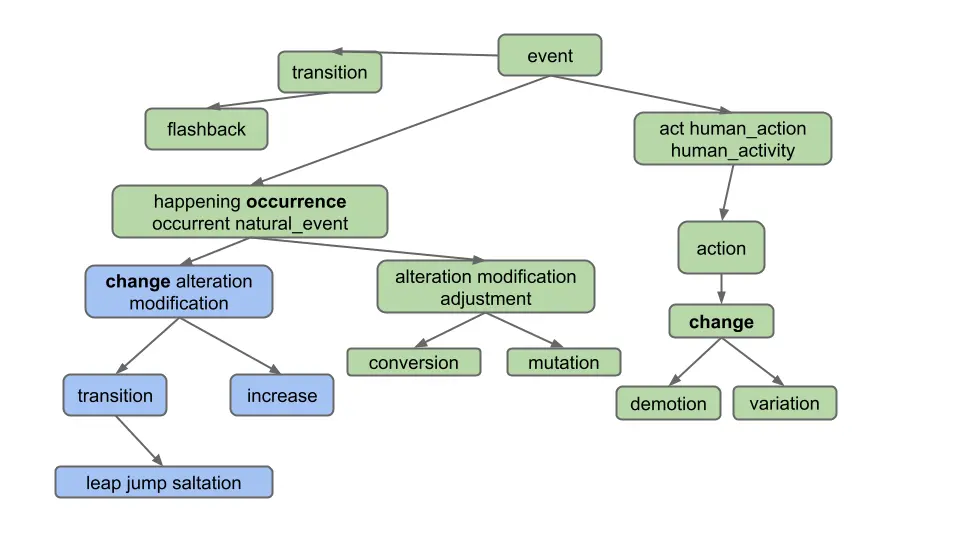
As you can see, we only want to return words which are hyponyms of ALL words in the list. Furthermore, note that the list of words provided by the user can include more than just 2 words, even though our examples in this spec do not.
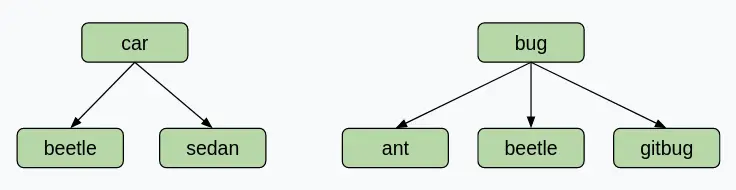
Note that it is possible for two words to share hyponyms without necessarily sharing nodes. Take a look at this example. If the user enters “car, bug” for the diagram below, we should get [beetle], not [] (empty list)! This example shows that we are getting the intersection of words, not nodes.
For some more examples which demonstrate the usefulness of this feature, let’s say we are using the full synsets_size82191.txt and hyponyms_size82191.txt.
- Entering “video, recording” in the words box and clicking “Hyponyms” should display
[video, video_recording, videocassette, videotape], as these are all the words which are hyponyms of “video” and “recording”. - Entering “pastry, tart” in the words box and then clicking “Hyponyms” should display
[apple_tart, lobster_tart, quiche, quiche_Lorraine, tart, tartlet ].
Task 5: Lists of Words
Modify your
HyponymsHandlerand the rest of your implementation to deal with the List of Words case.
To test this part of your code, we recommend manually constructing examples using synsets_size16.txt and hyponyms_size16.txt and using the provided front end to evaluate correctness.
For testing the List of Words case, see the Testing spec for more information.
Handling k != 0
We have now handled the situation where k = 0, which is the default value when the user does not enter a k value.
Your final objective is to handle the case where the user enters k. k represents the maximum number of hyponyms that we want in our output. For example, if someone enters the word “dog”, and then enters k = 5, your code would return exactly 5 words.
To choose the 5 hyponyms, you should return the k words which occurred the most times in the time range requested. For example, if someone entered words = "food, cake", startYear = 1950, endYear = 1990, and k = 5, then you would find the 5 most popular words in that time period that are hyponyms of both food and cake. Here, the popularity is defined as the total number of times the word appears over the entire time period. The autograder will not have any cases where there are ties and ties can be broken arbitrarily/randomly.
The words should then be returned in alphabetical order. In this case, the answer is [cake, cookie, kiss, snap, wafer] if we’re using word_history_size14377.csv, synsets_size82191.txt, and hyponyms_size82191.txt.
Be sure you are getting the words that appear with the highest counts, not the highest weights. Otherwise, you will run into issues that are very difficult to debug!
It might be hard to figure out the hyponyms of words with k != 0 on the big files, so we are providing data that is easier to visualize! Below, you’ll see a modified version of EECS class requirements, inspired by HKN. We have also provided the data that represents the graph below (word_history_eecs.csv, hyponyms_eecs.txt, synsets_eecs.txt). If someone entered words = ["CS61A"], startYear = 2010, endYear = 2020, and k = 4, you should receive "[CS170, CS61A, CS61B, CS61C]". This word_history_eecs.csv is a bit different from the previous one since it has values with the same frequencies. We highly recommend that you take a look at word_history_eecs.csv. While you are designing your implementation, keep in mind that we can give you words with the same frequencies (just that you don’t need to break ties for words with the same frequency).
The EECS-course guide is not available on the interactive web staff solution so it won’t return anything if you give the input
CS61A. However, the autograder will provide the query information and expected response for any failing test using the EECS dataset. We recommend using this information to replicate the autograder tests locally and debug from there.
Note
- If the front end doesn’t supply a year, default values of
startYear = 1900andendYear = 2020are provided byNGordnetQueryHandler.readQueryMap. - If
k = 0, or the user does not enterk(which results in a default value of zero), then thestartYearandendYearshould be totally ignored. - If a word never occurs in the time frame specified, i.e. the count is zero, it should not be returned. In other words, if
k > 0, we should not show any words that do not appear in thengramsdataset. - If there are no words that have non-zero counts, you should return an empty list, i.e.
[]. - If there are fewer than
kwords with non-zero counts, return only those words. For example if you enter the word “potato” and enter “k = 15”, but only 7 hyponyms of potato have non-zero counts, you’d return only 7 words.
Task 6: Nonzero k
Modify your HyponymsHandler and the rest of your implementation to deal with the k != 0 case.
This task will be a little trickier since you’ll need to figure out how to pass information around such that the
HyponymsHandler knows how to access a “useful” NGramMap.
In addition, we recommend handling the k != 0 case separately from the k == 0 case, as your implementation will be building off of what you’ve already done in Project 2B.
This means your code should still be able to handle the k == 0 case.
For testing the k != 0 case, see the Testing spec for more information.
TimeSeries
You might have noticed we didn’t provide a
TimeSeriesclass. Remember that aTimeSeriesextends theTreeMapclass, meaning if you want to use any of its equivalent methods, you can substituteTimeSeriesobjects withTreeMapobjects and call the respectiveTreeMapmethod (e.g. instead ofdata()you would usevalues()).NGramMap
Do not make a static NGramMap for this task! It might be tempting to simply make some sort of
public static NGramMapthat can be accessed from anywhere in your code. This is called a "global variable". We strongly discourage this way of thinking about programming, and instead suggest that you should be passing an NGramMap to either constructors or methods. We’ll come back to talking about this during the software engineering lectures.
Task 7: Autograder Buddy
Throughout this assignment, we’ve had you use your front end to test your code. Our grader is not sophisticated enough to pretend to be a web browser and call your code. Instead, we’ll need you to provide a method in the AutograderBuddy class that provides a handler that can deal with hyponyms requests.
When you ran git pull skeleton main at the start of this spec, you should have received a file called AutograderBuddy.java.
Open AutograderBuddy.java and fill in the getHyponymHandler method such that it returns a HyponymsHandler that uses synsetFile, hyponymFile, wordHistoryFile, and yearHistoryFile. Your code here should be quite similar to your code in Main.java.
Now that you’ve created AutograderBuddy, you can submit to the autograder. If you fail any tests, you should be able to replicate them locally as Truth tests by building on the test files above. If any additional data files are needed, they will be added to this section as links.
Submission
Try submitting to the autograder. You may or may not pass everything.
- If you fail a correctness test, this means that there is a case that your local tests did not cover.
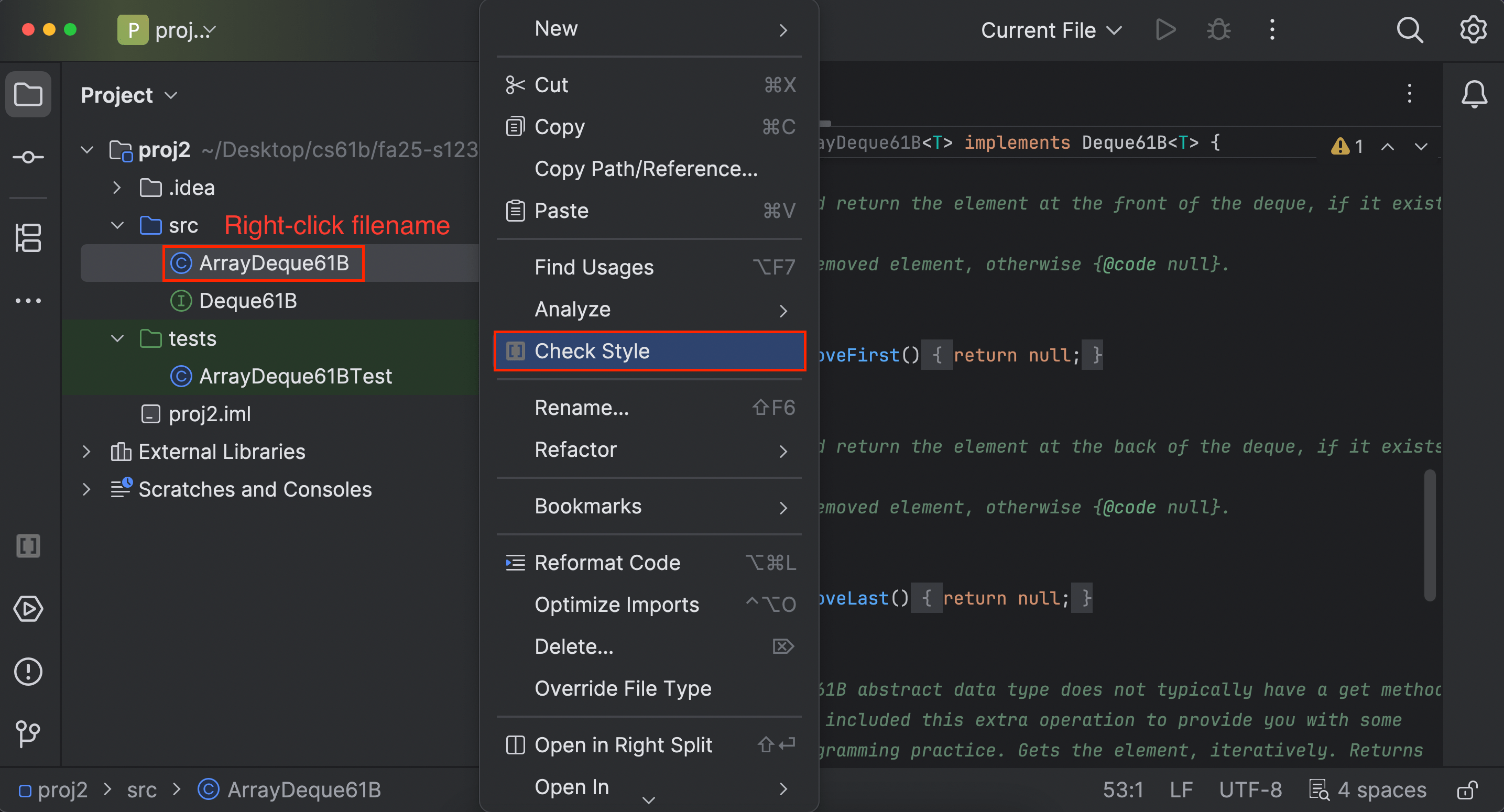
- The autograder will not run unless you fix all your style errors. Reminder that you can check style in IntelliJ as often as you’d like:
- You will have a token limit of 8 tokens every 24 hours. We will not reinstate tokens for failing to add/commit/push your code, run style, etc.
Project 2B will be worth 26 points.
Grading breakdown:
- HyponymHandler k == 0 Single Word (~25%)
- HyponymHandler k == 0 Multi Word (~25%)
- HyponymHandler k != 0 Single Word (~25%)
- HyponymHandler k != 0 Multi Word (~25%)
The score you receive on Gradescope is your final score for this assignment (assuming you followed the collaboration policy).
Front End
The remainder of this assignment is optional, but strongly recommended.
Setup
This portion of the project combines the powers of NGramMap (Project 2A)
and WordNet (Project 2B). To get started, copy TimeSeries, NGramMap, HistoryHandler and
HistoryTextHandler from Project 2A into
Project 2B. You should also adjust Main.java so that it registers all
three handlers.
Adding New Buttons
Getting a list of hyponyms is cool, but what can sometimes be even cooler is plotting their relative frequencies. For example, if the user enters the words “food, cake”, startYear = 1900, endYear = 2020, k = 8 and clicks “Hypohist”, they’d be able to see the relative frequency of the 8 most popular words which were hyponyms of food and cake over the time period between 1900 and 2020.
In this part, you’ll edit three different types of files:
- HTML
- JavaScript
- Java
We assume that you have NO prior familiarity with HTML or JavaScript. It is very common in real-world projects to have to modify code with which you are not familiar, even possibly in programming languages you have never seen.
Adding the Hypohist Buttons
Open the ngordnet.html file. Locate the code that creates the existing buttons, e.g. History and Hyponyms. Using
your intuition, copy and paste the pieces of code that you think are necessary to create two new buttons that say
“Hypohist” and “Hypohist (text)”.
When you’re done, try clicking the Hypohist button, and nothing will happen.
Creating a Hypohist Handler
Back in Ngordnet.main.Main, register a new Handler called HypohistHandler. It should be registered to the String
hypohist. This handler should simply return the text “hello i am hypohist”. Run your Java server, and it is now ready
to listen for Hypohist clicks.
With your server running, try clicking the Hypohist button, and … still nothing will happen!
JavaScript Callbacks
Even though our server is listening for Hypohist clicks, and we are clicking the Hypohist button, nothing is happening!
That is, your browser isn’t even trying to send the query over to your Java file. This is because HTML code is generally dumb, i.e. basically doesn’t do anything but specify what the website should look like.
The language typically used to describe how a page works is called JavaScript. Despite the name, it has literally nothing to do with Java, and is widely believed to have been a marketing ploy (see this page or this video by JavaScript’s creator Brendan Eich) in the mid-1990s when Java was new and cool, and JavaScript was just coming into existence.
Let’s peer inside the dark universe of front-end JavaScript programming. Open “ngordnet.js”. This is the code that acts as the middleman between the beautiful (?) visual user interface in the browser and your Java code. Note that the HTML and Javascript files for this project are not up to professional standards, and I honestly hacked them together pretty quickly, keeping them as simple as possible so you would feel at least slightly comfortable playing around with them.
Your difficult task: Try modifying the Javascript code so that when you click the “Hypohist” button, you successfully get back the
text outputted by your HypohistHandler, which should be “hello i am hypohist” if you used my exact suggestion above. We suggest not using LLMs for this task, and instead try to figure it out by pure intuition.
The very old-school word for this process of just fumbling your way through a quick and dirty programming job is “hacking”, though the word has many competing meanings these days.
Tips:
- Pattern match carefully!
- Feel free to edit, test, and experiment. You’re not going to break anything permanently.
- Use git checkout to get the original version of the JS file if you break something.
- Don’t cheat by just asking an LLM what to do. This skill of editing and experimenting with code you don’t understand is important when prototyping and hacking together code.
- In the real world, production code should never ship what was created via this hacking process. However, it can be very useful for prototyping!
Hypohist
Next, fill out the handler for the Hypohist button so that it behaves as expected, that is, this button should return a plot of the relative frequency of the words returned by Hyponyms over the period stated.
That is, we’ll do what we said above: For example, if the user enters the words "food, cake", sets startYear=1900,
endYear=2020, and k=8, and clicks the “Hypohist” button, they’d be able to see the relative frequency of the 8 most
popular words which were hyponyms of food and cake over the time period between 1900 and 2020.
Behavior is pretty straightforward if k > 0 for Hypohist. If k = 0, it’s not clear what should happen. Maybe come up with a cool idea.
If you’d like to go above and beyond in this project, read through the Optional Features spec!
The WordNet part of this assignment is loosely adapted from Alina Ene and Kevin Wayne’s Wordnet assignment at Princeton University.